
Is Your Flutter App Ready for the Foldable iPhone? A Practical Readiness Guide
Is Your Flutter App Ready for the Foldable iPhone? A Practical Readiness Guide
 Deepanshu

Summarize with AI
Not enough time? Get the key points instantly.


Table of Contents
Why iPhone Duo Deserves a Place on Your Roadmap
Three Things That Change for Users and Designers
Start with the Right Build Setup
What Flutter Already Handles Well
The Missing Piece on iOS
Design Cases That Often Catch Teams Off Guard
Native Liquid Glass or Your Own Design?
Open-Source Helpers That Can Save Time
A Readiness Checklist for Your Team
Known Gaps and Honest Caveats
FAQs
Conclusion: Adapt Once, Delight on Every Pose
The first foldable iPhone is no longer a rumor. iPhone Duo reached customers on October 23, 2026, and for teams that ship a Flutter app for iPhone Duo, one gentle but important question follows: what does our product look like on it today? Simply rebuilding the project is not enough to answer it well. The device offers two displays, several physical poses, and a hinge that sits right where your content may be.
This guide walks through the full picture in plain language: what changes for users, how to set up the build correctly, what Flutter already does for you, where the gaps are on iOS, and how to keep the effort sensible for a market that is still young. Whether you lead a product, design the interface or write the code, you will find a clear starting point here.
Key takeaways
- Build with Xcode 27.1, adopt the UIScene lifecycle and keep orientation unlocked, so the app can use the full screen in every pose.
- Move navigation into the side strip, place list and details on either side of the fold, and open dialogs in one half.
- Protect state: a layout switch that rebuilds screens will reset scroll positions and half-written text.
- On iOS, a small bridge package is needed today to tell Flutter where the fold is.
- Plan the work in stages, starting with the build setup, then layout, then polish.
1. Why iPhone Duo Deserves a Place on Your Roadmap
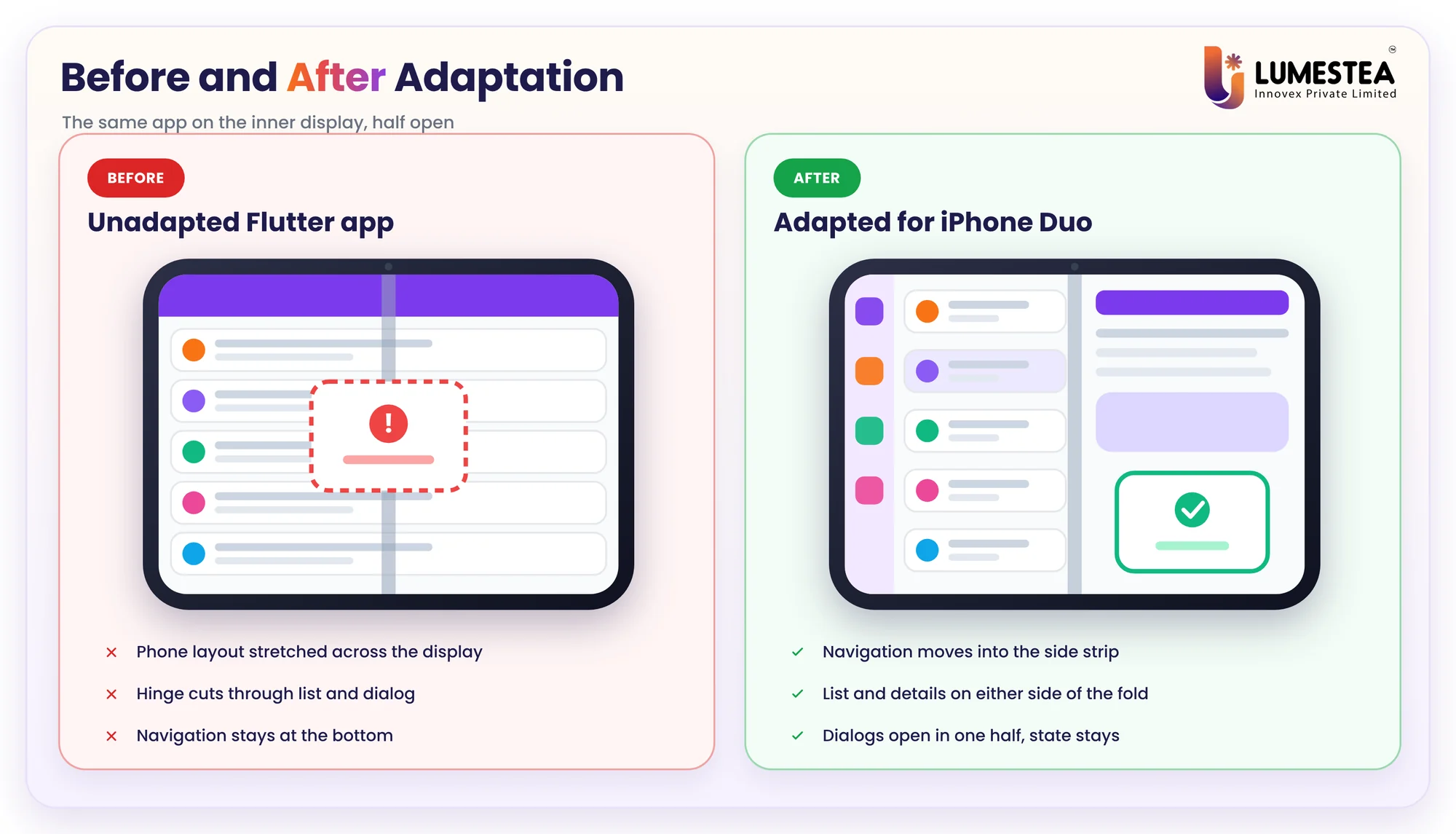
An existing app will install and run on iPhone Duo, so nothing breaks overnight. The difference lies in how well it runs, and a Flutter app for iPhone Duo therefore needs more than a rebuild. Depending on the Xcode version used for the build, an unadapted Flutter app either sits in a phone-sized window with black bars on both sides, or stretches a phone layout across an almost square display. In a half-open pose, the crease can run straight through a list, and a dialog can land right on the hinge.
Apple notes that apps built with its standard system components and designed to resize will adapt to the new poses with very little effort. Flutter, however, draws its own widgets rather than relying on those system components, so that promise does not extend to a Flutter app automatically. The adaptation needs to be designed and built on purpose.
There is also a practical timeline to keep in mind. From April 2027, every app submitted to the App Store needs iPhone Duo screenshots, and an app built with Xcode 27.1 displays a badge on its store page showing that it is optimized for the device. Since foldables are still a small segment, the goal is a cost-effective approach: do the essential work well, and avoid redesigning the whole product.
2. Three Things That Change for Users and Designers
iPhone Duo has two displays. The outer display is wider and shorter than any earlier iPhone screen, while the inner display is tablet-like, with a 1.4:1 shape, and people may use it flat, in landscape or portrait, or half open like a small book or laptop. Apple describes how apps are expected to behave in each pose in its Human Interface Guidelines, and three shifts matter most for a product team.
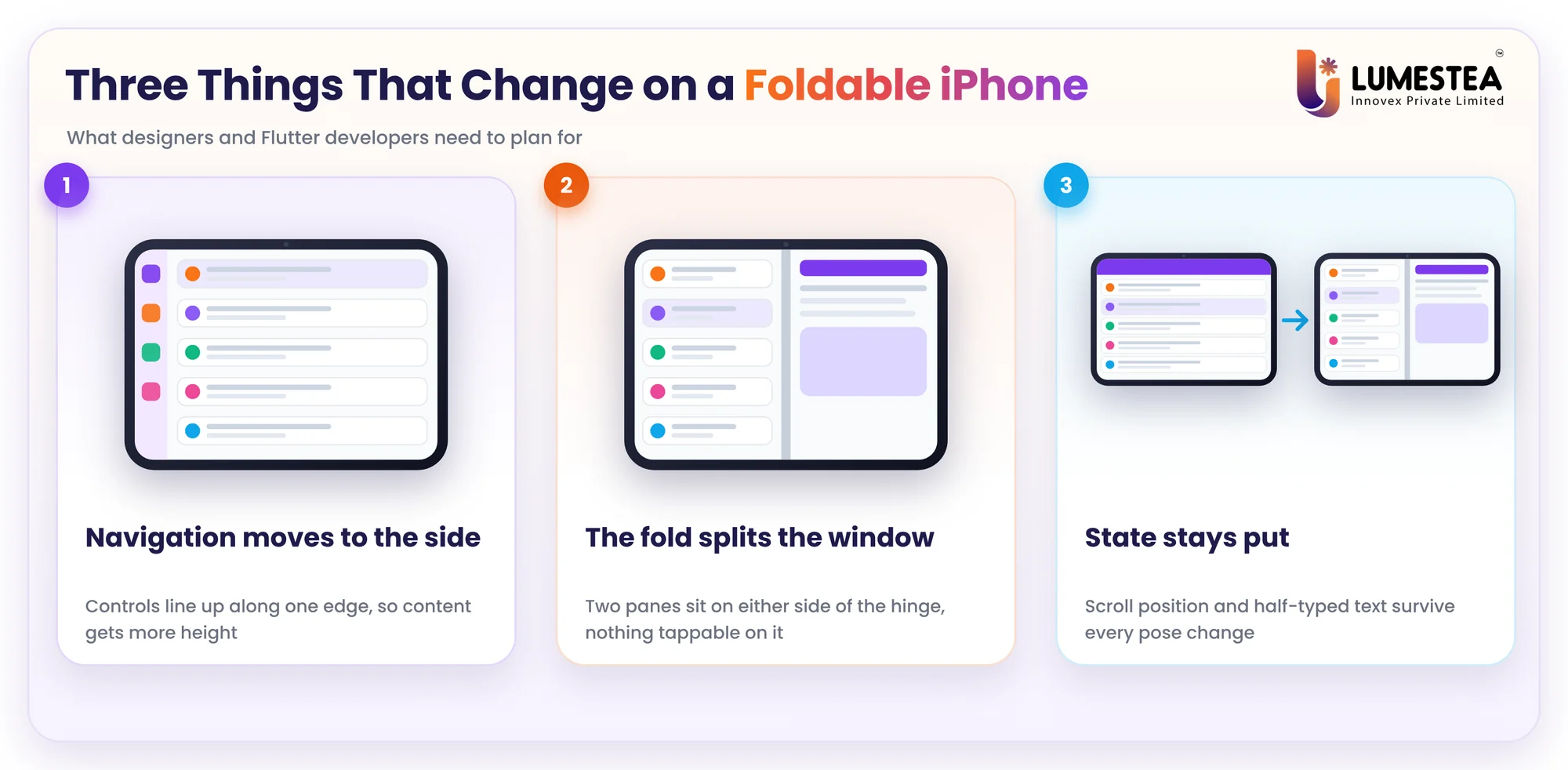
Navigation moves to the side. On the outer display, and on the inner display in landscape, the system lines the status bar and app controls along one edge so that content has more height. Apple’s advice is to leave the default bar placement alone. For a Flutter app, that means bottom navigation belongs in the side strip in those poses, ideally together with the back button and app bar actions.
The fold splits the window. In a half-open pose, a folding region runs across the inner display, and nothing a person needs to tap should sit on it. A list and its details work well on either side of the fold, and system alerts and sheets already move away from it on their own.
State stays put. Moving between poses must never reset a scroll position or clear a message someone was typing. Treat the pose change as a resize, not as a new app launch.
These ideas connect naturally with broader interface thinking, which we explore in our overview of UX trends shaping 2026. Designing for flexible screens early is far easier than retrofitting later.
3. Start with the Right Build Setup
How much of the screen your app receives depends on the Xcode version used to build it. With Xcode 26 or earlier, the app runs in a compatibility mode: it does not extend beneath the status bar and camera, and on the inner display it stays phone-sized. Xcode 27.0 stretches the app across the display up to the status bar, and Xcode 27.1 hands it the whole screen, with the side strip appearing as padding. An unadapted Flutter app does not know what to do with that padding, so content may slide under the camera, or an empty column may appear beside it.
Before any layout work, it helps to get the following foundations in place:
- Build with Xcode 27.1 and the iOS 27.1 SDK. This unlocks the full-screen behavior described above.
- Adopt the UIScene lifecycle. An app built with the iOS 27 SDK that has not adopted it fails to launch. Projects created with Flutter 3.41 or later already include it, and an unmodified app delegate is migrated automatically. A customized delegate needs the manual steps in Flutter’s UIScene guidance. Afterwards, review plugins that depend on app lifecycle callbacks, such as push notifications and deep links.
- Target iOS 15.0 or later. Xcode 27 rejects lower deployment targets. Flutter 3.47 sets this for new projects; on older versions, raise Minimum Deployments in the Runner target. If you still use CocoaPods, raise the platform in your Podfile as well.
- Do not lock the orientation. The inner display ignores declared orientations, but combining a portrait-only declaration with the full-screen requirement setting may make iOS scale the app into a portrait window and report no fold. A lock applied in code can also turn your interface on its side when the device opens in landscape.
- Test in Device Hub. Xcode 27.1 includes a simulated iPhone Duo that can be opened, closed, rotated and folded, so a physical device is not required to start.
# ios/Podfile (CocoaPods projects)
platform :ios, '15.0'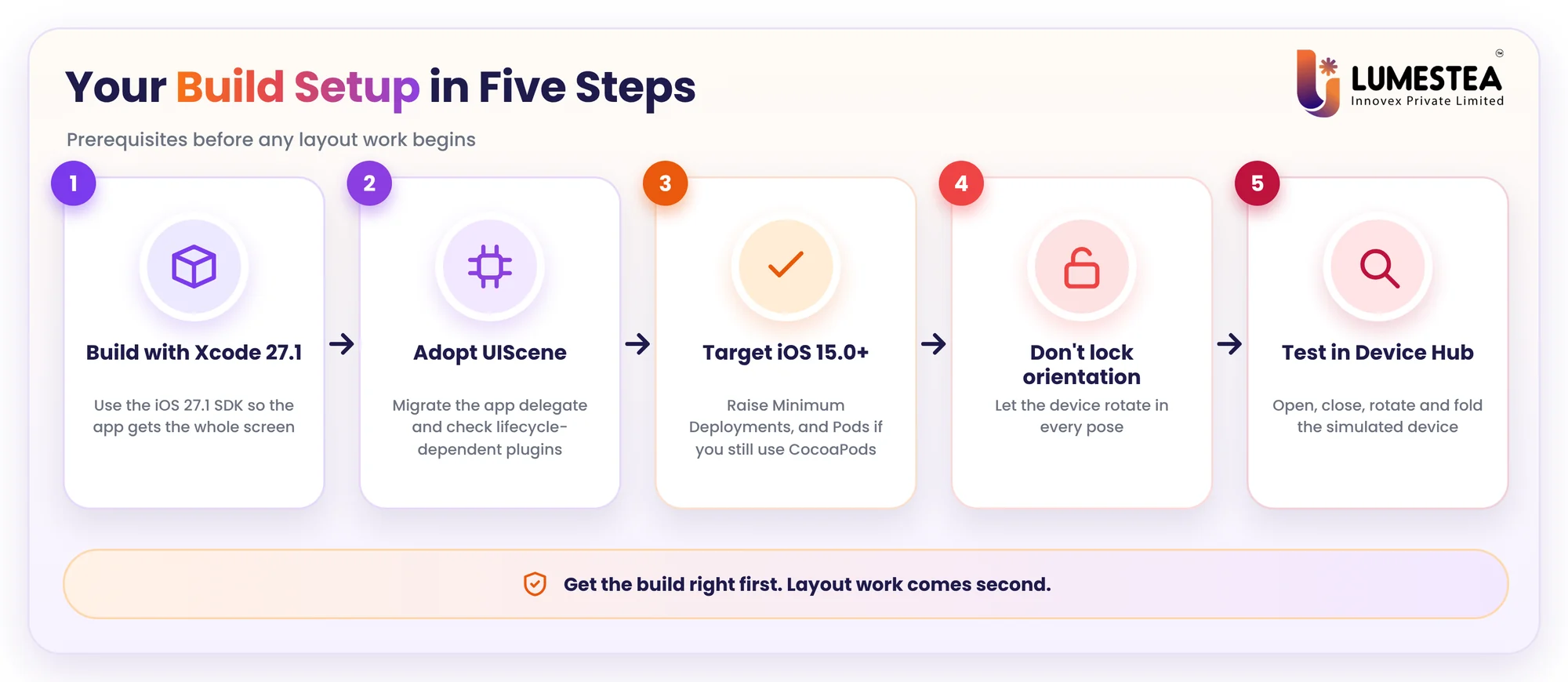
A small note from experience with the simulator: if the fold stays missing after you remove an orientation lock, rebooting the simulator may be needed before it is reported again.
4. What Flutter Already Handles Well
For Flutter, opening, closing or rotating the device is simply a resize. The window receives a new size and new insets, and the app rebuilds with fresh MediaQuery data. A layout built on MediaQuery.sizeOf and LayoutBuilder will follow along gracefully, while one that caches the screen size or locks the orientation will not. Folding the inner display half open is a little different: the window keeps its size and insets, and only the fold changes.
Two parts of MediaQuery describe the device:
- viewPadding carries the side strip. On iOS, the edge with the status bar and camera arrives as an inset along that entire side, so a SafeArea keeps content clear of it.
- displayFeatures carries the fold and camera cutouts, each with its bounds and, for a fold, its posture.
Flutter also puts display features to work. Dialogs, bottom sheets and other routes accept an anchorPoint, and DisplayFeatureSubScreen opens the route in the half of the screen nearest to that point. On Android foldables, all of this works today.
5. The Missing Piece on iOS
On iPhone Duo, MediaQuery.displayFeaturesOf(context) currently returns an empty list in every pose, because Flutter only fills it on Android. A proposal to change this (flutter/flutter#192515) was still open as of October 28, 2026, and its fix was waiting in review for Flutter’s CI to move to Xcode 27.1.
Until that lands, a bridge plugin must read the reserved regions natively and publish them to Flutter. The community package foldable does exactly this. With the fold available in MediaQuery, Flutter keeps dialogs, sheets and popups of a half-open device in one half, just as it does on Android.
Two gaps are worth knowing about:
- While the device is closed, the bridge publishes nothing, so your layout does not learn where the camera and the cluster of status items around it sit on the outer display. If you rely on the side strip there, publish those regions yourself from the reserved regions the bridge reports, or navigation may end up under the camera in landscape.
- On the simulator, the fold reaches Flutter about a second after the device settles in the half-open pose, because the reserved regions update after the hinge.
The good news is that layout code written against MediaQuery will keep working. When Flutter supports iOS display features natively, the bridge can simply be removed.
6. Design Cases That Often Catch Teams Off Guard
Reading the fold is the easier half of the job. The cases below appear in almost every Flutter app on iPhone Duo, and each has a straightforward answer in plain Flutter.
Keeping state across poses. The obvious way to add a second pane is to switch the layout when a fold appears. The catch is that swapping a single list for a Row changes the widget tree, so Flutter discards the old list and builds a new one. Scroll position and typed text disappear with it. Giving each pane a GlobalKey lets Flutter move the existing state to its new parent instead.
final listPane = KeyedSubtree(key: _listKey, child: const MessageList());
final detailPane = KeyedSubtree(key: _detailKey, child: const MessageDetail());

return hasFold
    ? Row(children: [
        Expanded(child: listPane),
        Expanded(child: detailPane),
      ])
    : listPane;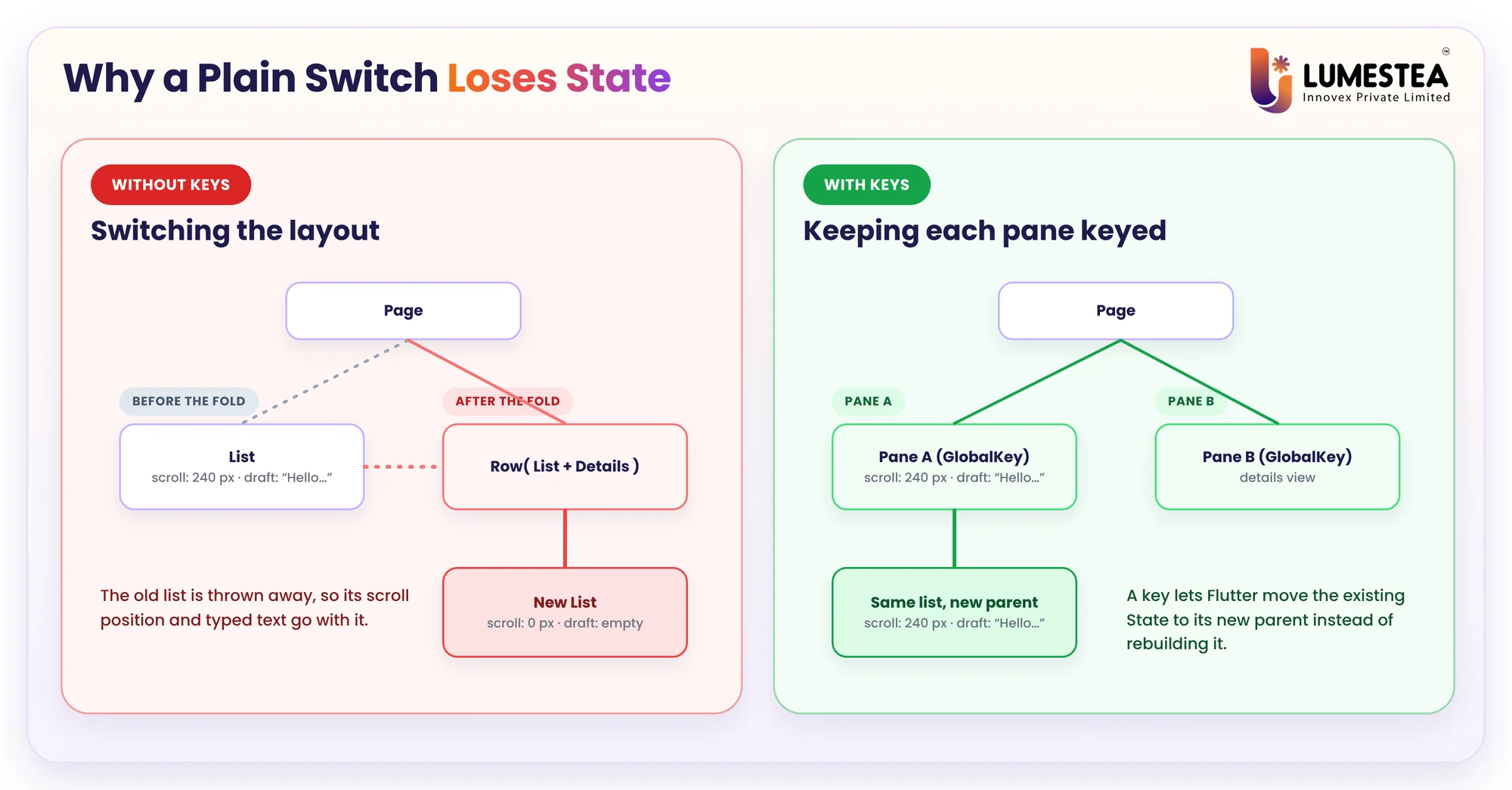
The keyboard in laptop pose. In the laptop pose, the keyboard opens in the lower half, and if the whole screen makes room for it, the upper half jumps for no reason. Only the pane below the fold should resize. MediaQueryData.removeDisplayFeatures can trim the padding and keyboard inset to the area each pane covers, provided nothing above the panes reacts to the keyboard first. A Scaffold does so by default, so set resizeToAvoidBottomInset to false on it.
Dialogs in the right half. A dialog opened while the device is flat should move into one half once the device folds, and the choice of half matters: reading content fits above a horizontal fold, and controls fit below it, within easy reach. Passing an anchorPoint keeps the route in the chosen half.
showDialog(
  context: context,
  // Top of the window: the content half above a horizontal fold.
  anchorPoint: const Offset(double.maxFinite, 0),
  builder: (_) => const ConfirmDialog(),
);
Things that only look like a fold or a strip. A fold at the edge of a window in Split View does not split anything. An Android phone’s camera cutout in landscape produces the same one-sided inset as a side strip. A camera from the previous pose can also linger briefly after the device moves, so avoid reacting to every transient value.
Right-to-left languages. The first pane and the dialogs swap sides, but the side strip does not, because it follows the hardware.
7. Native Liquid Glass or Your Own Design?
Liquid Glass is a material rendered by UIKit and SwiftUI. Flutter draws every pixel itself, so its widgets can only imitate it, and a community request for native support (flutter/flutter#170310) has been open since June 2025. Teams currently have three realistic options:
- Embed native views as platform views. The adaptive_platform_ui package does this for toolbars and tab bars, and on iPhone Duo it lays out its own toolbar in the strip, including in the left pane of Split View, with an overflow menu for items that do not fit. The trade-off is performance, since each native control is a platform view that costs more to compose than a Flutter widget, most visibly over scrolling content.
- Imitate the material inside Flutter. Packages that draw glass with shaders and BackdropFilter avoid platform views, but what they draw remains an imitation. Liquid Glass widgets merged into cupertino_ui on October 20, 2026 are not part of a release yet.
- Keep your own design language. If your product has a distinctive look, or uses Material on iOS, simply place your own navigation in the strip.
Choose native Liquid Glass when authentic system chrome is a product requirement, and a custom design when brand consistency across platforms matters more. Either way, the handling of two panes and dialogs at the fold is a separate task that works with both approaches.
8. Open-Source Helpers That Can Save Time
Several community packages already take on iPhone Duo. One example is duo_kit, an open-source package created by the LeanCode team. At version 0.1, it offers building blocks that mirror Apple’s own concepts, and it requires Flutter 3.41 or later:
| Building block | Role in your app |
| FoldScaffold | Places your navigation in the strip or at the bottom, while you keep control of how it looks. |
| FoldSplitView | Puts two panes on either side of the fold and keeps their state. |
| FoldAnchor | Chooses the anchor point so dialogs open in the appropriate half. |
| FoldGeometry | Reads the strip, fold and cutouts from MediaQuery. |
It handles layout only, so the navigation and panes remain yours to design. It also ships debug tools that overlay the geometry and switch between simulated poses, plus test helpers with window metrics measured on the iPhone Duo simulator. If you adopt a package like this, review its maturity, license and maintenance activity first, as you would for any dependency.
For teams weighing architectural choices, it is worth remembering that decisions about layout structure and state handling are easier to settle early, a theme we discuss in why software product engineering projects fail.
9. A Readiness Checklist for Your Team
Use this list to prepare your Flutter app for iPhone Duo in a sensible order:
- Rebuild with Xcode 27.1 and confirm the app uses the full screen.
- Complete the UIScene migration and check lifecycle-dependent plugins.
- Raise the deployment target to iOS 15.0 or later.
- Remove orientation locks and full-screen restrictions that are not needed.
- Wrap content in SafeArea and read insets from MediaQuery, not from cached sizes.
- Move navigation into the side strip where the system places it.
- Add a two-pane layout for list and details, with a key on each pane.
- Anchor dialogs and sheets so they open in one half of a folded window.
- Test every pose in Device Hub, including keyboard, dialogs and language direction.
- Prepare iPhone Duo screenshots well ahead of the April 2027 requirement.
Light, repeatable routines work better here than one large effort. A small adaptive-layout review in each release cycle keeps the app healthy, much like the approach described in How to Implement a Tech Process to Avoid Tech Debt (Without Slowing Down).
10. Known Gaps and Honest Caveats
It is better to be transparent about what is still evolving:
- On the left side of Split View, a Flutter app does not receive a strip, because the status bar and camera sit on the other side and Flutter does not yet read UIKit’s vertical bar edge trait. Navigation stays at the bottom there.
- The current helper packages have been tested on the iPhone Duo simulator, and real-device behavior should be verified on your own hardware before a major release.
- Flutter’s native support for iOS display features is still in progress, so expect to revisit the bridge once it ships.
11. Frequently Asked Questions
1) What is iPhone Duo?
iPhone Duo is Apple’s first foldable iPhone, which reached customers on October 23, 2026. It has an outer display and a larger, tablet-like inner display that can be used flat or half open.
2) Will my existing Flutter app run on iPhone Duo?
Yes, existing apps install and run on the device. Running well is a separate matter, because an unadapted app may appear phone-sized with black bars or stretched across the inner display.
3) Do I need Xcode 27.1?
To give your app the whole screen, yes. Building with Xcode 27.1 and the iOS 27.1 SDK also adds the iPhone Duo badge to your App Store page.
4) Why does a Flutter app not adapt automatically?
Apple’s automatic adaptation applies to apps built with standard system components. Flutter draws its own widgets, so layout, navigation and fold handling need to be designed and implemented deliberately.
5) When are iPhone Duo screenshots required?
From April 2027, apps and games submitted to App Store Connect need iPhone Duo screenshots.
6) Do I need a physical iPhone Duo to begin testing?
No. Device Hub in Xcode 27.1 provides a simulated iPhone Duo that can be opened, closed, rotated and folded. A physical device remains valuable for final verification.
7) Should I use native Liquid Glass or a Flutter-drawn design?
Choose native views when authentic system chrome is essential and you accept the performance cost of platform views. Choose a Flutter-drawn or custom design when brand consistency and rendering performance matter more.
8) Where should a team start?
Start with the build setup, then add side-strip navigation, a two-pane layout with keyed panes, and anchored dialogs. Test each pose in Device Hub and expand in stages.
12. Conclusion: Adapt Once, Delight on Every Pose
A foldable iPhone changes how people hold, open and use your app. The encouraging part is that the essential work is well defined: a correct build setup, side-strip navigation, two panes that respect the fold, dialogs that open in the right half, and state that never resets. Done in stages, this is a manageable investment that also pays off on Android foldables and tablets.
Start with the build, add the layout pieces one by one, and test every pose as you go. The aim is not to reinvent the product, it is to let your Flutter app for iPhone Duo feel at home on a new kind of screen.
At Lumestea Innovex, our teams bring together mobile and web application development, UX design, quality assurance and cloud engineering to help organizations build products that work well across devices. If you are planning for iPhone Duo or other new form factors, we would be glad to explore the right starting point with you. Teams that need extra capacity may also find our Offshore Software Development guide helpful.