

How to Build an AI Companion Platform in 2026 (Architecture, Cost, Features & Compliance)
How to Build an AI Companion Platform in 2026 (Architecture, Cost, Features & Compliance)
 Pushpa

Summarize with AI
Not enough time? Get the key points instantly.


Table of Contents
Why AI Companion Products Are Scaling Faster Than Typical Chat Apps
- The companion feels familiar (tone, style, boundaries)
- Conversations continue across days/weeks (memory)
- The experience is private, immersive, and always available
NSFW Mode or Adult Content: Design Constraints (High-Level)
- Strong age verification and region controls
- Clear consent + disclosures
- Separate moderation pipeline and faster policy updates without risking total downtime
- Audit logs for enforcement actions
Core Features Users
- MVP (launch fast, validate monetization)
- V2 (conversion boosters)
- V3 (premium ARPU)
Final Takeaway
AI companion products are winning because they’re built for continuity, not quick answers. Unlike utility chatbots (where users churn after getting what they need), companion platforms monetize time, personalization, and emotional consistency—which creates stronger retention and higher subscription potential.
This guide breaks down what actually matters when building a scalable companion platform: architecture choices, memory strategy, safety/compliance, feature roadmap, and real cost drivers.
Why AI Companion Products Are Scaling Faster Than Typical Chat Apps
Companion experiences are “relationship products.” Users return because:
- The companion feels familiar (tone, style, boundaries)
- Conversations continue across days/weeks (memory)
- The experience is private, immersive, and always available
This category is also becoming a serious revenue segment—AI companion apps have shown meaningful consumer spend growth in recent years.
What Makes a Great Companion Experience (Not Just a Good Chatbot)
A strong companion platform is designed around 4 pillars:
1) Identity & Personality Controls
Users want to shape the companion: personality, tone, “how it speaks,” boundaries, and preferences. This is the fastest path to “my companion” instead of “a chatbot.”
2) Session Continuity (Memory That Feels Real)
Memory must be:
- Useful (brings up relevant preferences)
- Safe (doesn’t reveal sensitive data unexpectedly)
- Cost-controlled (doesn’t grow infinitely)
3) Low-Latency Conversation Flow
If responses lag or the UI feels “chat-app generic,” immersion breaks. Real-time UX matters more here than in normal SaaS chat.
4) Trust & Safety by Design
Privacy controls, transparent policies, and robust age gating (where relevant) directly affect retention and conversion.
Production-Ready Architecture (What We Recommend)
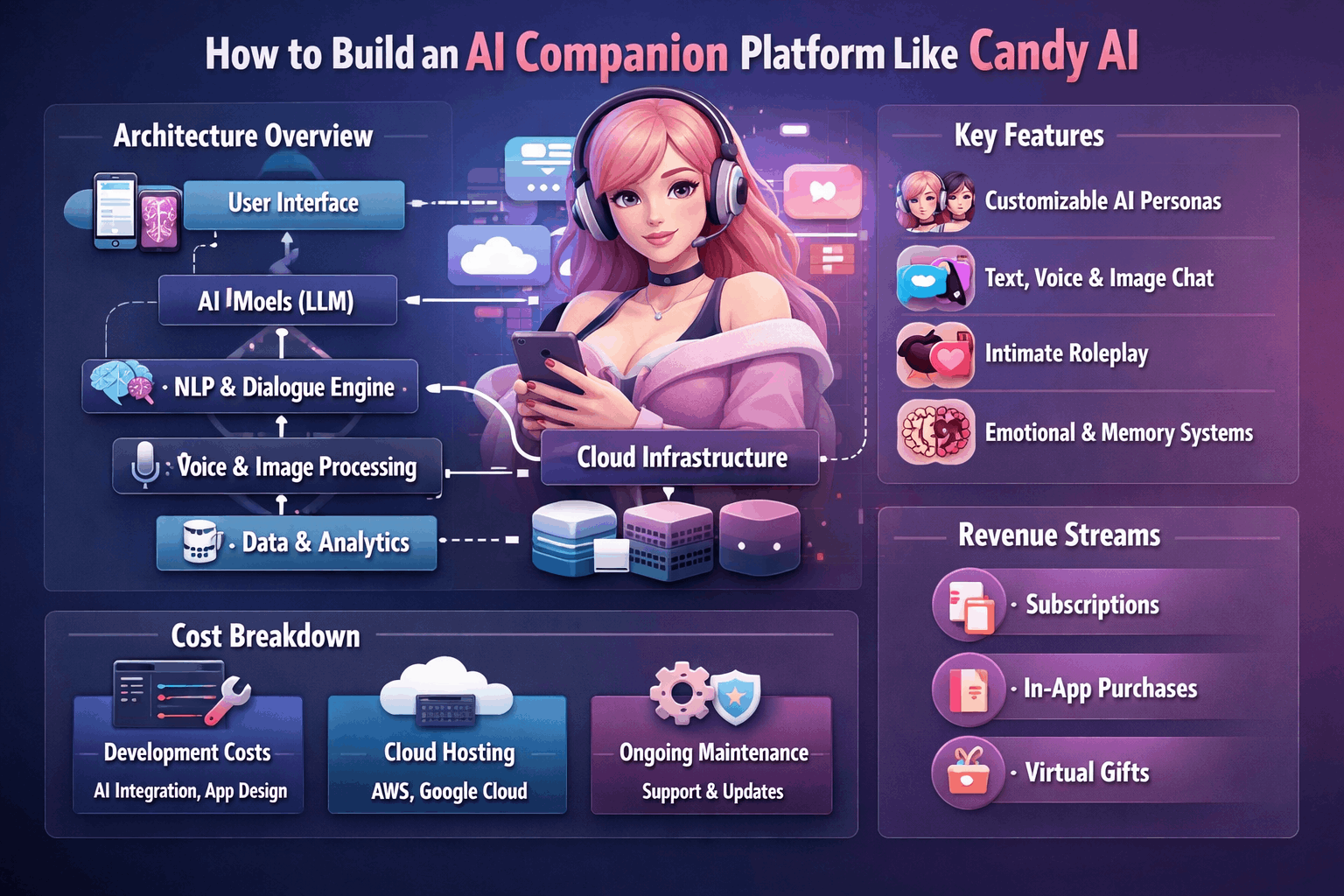
A scalable AI companion platform is best treated like a real-time messaging system + AI inference orchestration + memory pipeline.
A) Client Apps (Mobile-first)
- Web app (React / Next.js) or Flutter (if native)
- PWA support for fast distribution
- Streaming responses (token streaming) for “typing realism”
- Optional voice UI (push-to-talk)
B) Real-Time Chat Gateway
- WebSockets/SSE for live updates and streaming tokens
- A stateless gateway that authenticates, rate-limits, and routes events
WebSocket architecture best practices typically emphasize connection management, scaling, and reliability patterns.
C) Chat Orchestration Service (Stateless)
This service should NOT “hold the conversation” in memory permanently. It should:
- Validate input + apply policy mode (safe/strict)
- Build prompt context (recent messages + memory snippets)
- Call the inference layer
- Emit events back to the client (streaming)
D) Inference Layer (LLM + Optional Image/Voice)
- Text LLM for roleplay
- Optional image generation pipeline (gated by plan)
- Optional TTS/voice (often billed per minute due to cost)
E) Memory Layer (Where Many Products Fail)
Use a practical 3-tier memory approach:
- Short-term context (last N messages)
- Long-term memory (vector DB for “facts/preferences”)
- Profile memory (explicit user settings: tone, boundaries)
Critical rule: cap memory per plan tier so storage + retrieval costs don’t explode
F) Data Stores
- PostgreSQL: users, billing, subscriptions, audit logs
- Object storage: images/voice artifacts (encrypted)
- Vector DB: memory embeddings
- Redis: session cache, rate limits, ephemeral state
NSFW Mode or Adult Content: Design Constraints (High-Level)
If your product includes adult/explicit interactions, treat it as a separate policy mode with operational safeguards:
- Strong age verification and region controls
- Clear consent + disclosures
- Separate moderation pipeline and faster policy updates without risking total downtime
- Audit logs for enforcement actions
(Your legal counsel should define jurisdiction-specific requirements—this space changes quickly.)
Core Features Users Expect (MVP → Scale)
MVP (launch fast, validate monetization)
- Signup/login + subscription paywall
- Companion creation (personality + boundaries + style)
- Real-time chat with streaming
- Basic memory (“remember preferences” toggles)
- User privacy controls (delete chat, export, reset companion)
V2 (conversion boosters)
- Multiple companions / personas
- Memory timeline (“what I remember about you”)
- Image generation (paid tiers)
- Safety mode switch + reporting
V3 (premium ARPU)
- Voice calls / live voice chat (often pay-per-minute)
- “Relationship” mechanics (moods, check-ins, anniversaries)
- Creator marketplace (if you go platform route)
Cost to Build an AI Companion Platform (What Actually Drives Budget)
Build cost depends on scope, but ongoing inference cost is the bigger surprise—because it scales with usage.
A useful benchmark: conversational AI as a whole is forecasted to grow significantly this decade, which is driving more mature infrastructure patterns and competition.
Practical build ranges (typical MVP–V2)
- Text-only MVP (subscriptions + memory basic): $10k–$18k
- Text + images (gated tiers + moderation): $22k–$40k
- Text + images + voice: $45k–$80k+
Ongoing costs include:
- LLM tokens (messages + memory retrieval)
- Image generation GPU costs
- Voice minutes (TTS/STT)
- Moderation tooling + support
Monetization Models That Work
Best-performing companion apps usually stack revenue streams:
- Monthly/yearly subscriptions (core)
- Paid add-ons: extra companions, personality packs
- Usage-based voice minutes
- Image credits (packs)
- Premium memory tiers (“longer continuity”)
Launch Roadmap (Proven Low-Risk Sequence)
- Text-only MVP + subscriptions
- Improve retention with memory + personalization
- Add images (after you know users will pay/return)
- Add voice last (highest cost + complexity)
This reduces burn and keeps your learning loop tight.
Final Takeaway
A companion platform wins when it feels personal, continuous, and safe—and when the infrastructure is built to control cost under heavy engagement. If you want, Lumestea can help you plan the MVP scope, choose the right model stack, and design a roadmap that gets to revenue quickly without overbuilding.
Frequently Asked Questions
1) How long does it take to build an AI companion platform?
A text-first MVP (auth, character creation, real-time chat, basic memory, subscriptions) typically takes 8–12 weeks with a focused scope. Adding image generation usually pushes it to 12–16 weeks, and voice/call features can extend the roadmap to 4–6 months, depending on moderation and cost controls.
2) What’s the best tech stack for an AI companion app?
Most teams use a React/Next.js web app or Flutter for cross-platform mobile, with a Node.js backend for async workloads. For data, PostgreSQL works well for users/billing, Redis for rate-limits/session caching, and a vector database for long-term memory retrieval.
3) Do I need WebSockets for a companion chat experience?
If you want “real-time” immersion (typing feel, token streaming, live events), WebSockets or SSE are strongly recommended. They reduce perceived latency and make conversations feel more natural compared to request/response polling.
4) How does “memory” work in companion platforms?
The clean approach is three-layer memory:
- Short-term: recent message window for coherence
- Long-term: vector memory for stable preferences/facts
- Profile memory: explicit settings (tone, boundaries, interests)To control cost and avoid weird recall, memory should be filtered, capped by plan, and user-editable (“forget this”).
5) How do we control AI costs as users become highly engaged?/h3>
Costs scale with usage, not just user count. Common controls include:
- Plan-based token budgets and message limits
- Memory caps per tier
- Queueing + throttling during spikes
- Gating expensive features (images/voice) behind paid plans
This protects margins when retention improves.
6) Should we start with a white-label platform or a custom build?
A white-label approach can be good for speed to market and early validation. A custom build becomes important when you need deep personalization, unique UX, proprietary memory behavior, or full IP ownership. Many successful teams validate with a fast MVP, then replace components gradually.
7) What are the must-have features for an MVP?
For a revenue-validating MVP, focus on:
- Character creation (personality, tone, boundaries)
- Real-time chat (streaming responses)
- Basic memory + user controls (edit/forget)
- Subscriptions + usage tracking
- Privacy controls (delete chats, account controls)
8) How should we handle privacy and user trust?
Trust is a conversion and retention multiplier. Best practices include transparent data policies, strong authentication, encryption for sensitive data, user controls to delete/export, and clear separation between analytics and private conversation data.
9) If the platform includes adult/NSFW modes, what changes technically?
You’ll want policy-mode separation (safe mode vs adult mode) with:
- Age verification / access gating
- Region restrictions (where needed)
- Isolated moderation workflows
- Clear consent and reporting tools
This keeps enforcement updates fast without risking platform-wide downtime.
10) What monetization models work best for companion apps?
The strongest model is usually subscription-first, then layering:
- Paid add-ons (extra companions, premium personalities
- Image credits (packs)
- Voice minutes (usage-based)
- Bundles and higher tiers for extended memory
This reduces reliance on a single revenue stream.
11) How do we prevent users from churning early?
Churn typically happens when immersion breaks. Focus on:
- Fast responses + streaming
- Consistent personality and boundaries
- Memory that feels helpful (not creepy)
- Clear onboarding that sets expectations
- Lightweight “re-engagement” mechanics (mood check-ins, milestones)
12) What should we build first: text, images, or voice?
A proven rollout is Text → Images → Voice. Text validates retention and subscriptions with lowest cost and complexity. Images boost conversion once retention is stable. Voice often increases ARPU but adds the most operational cost and moderation complexity.